Xfer Records’ Serum techno presets are hard to find, even though this versatile synthesizer can create almost any sound you can imagine.
Quality presets made for techno production are rare, and producers struggle to find good options for this genre. The few techno presets that I tested stand out with their quality, especially when you have creators like Diode Eins behind them. Some specialized collections like the Hybrid Techno Serum Presets give you free demo packs with up to 25 presets to try out.
This detailed guide shows you how to make your own professional melodic techno presets instead of just using pre-made ones. You’ll learn the basic techniques and creative ways to craft unique sounds for your productions, whether you use the original Serum or Serum 2 techno presets. The guide covers everything from punchy bass presets to atmospheric textures and helps you build your own collection of xfer serum techno presets that match your style.
Essential Serum Fundamentals for Techno
You need to understand Xfer’s core elements to become skilled at its wavetable synthesizer. Creating professional techno sounds requires you to learn specific parts of Serum.
Interface Overview for Beginners
The Main view is your primary workspace in Serum. This central hub has oscillators, filters, LFOs, envelopes, and modulation controls. These are the foundations of crafting techno sounds. The interface splits into four main tabs: Main, FX, Matrix, and Global. Each tab helps you design sounds differently.
You can easily switch between sections by clicking the tab names at the top. Techno producers often move between the Main view to create sounds and the FX tab to add vital processing. Distortion, reverb, and compression define the techno esthetic.
Oscillator Section Basics
The oscillator section builds the foundation of any techno sound. Serum gives you two primary wavetable oscillators (OSC A and OSC B), a sub oscillator, and a noise oscillator. These elements help create everything from driving basslines to atmospheric textures.
These essential waveforms work great for techno-specific sounds:
Sine: Ideal for clean, punchy sub-bass elements
Saw: Perfect for aggressive, cutting leads and stabs
Square/Pulse: Excellent for hollow, industrial-style sounds
The WT pos (wavetable position) knob morphs between different waveform shapes. This powerful tool creates evolving techno textures. On top of that, it has a Unison feature that thickens sounds by stacking multiple voices with slight detuning. Be careful though – too much detuning can cause unwanted phasing problems.
Understanding the Filter Section
Serum’s filter section packs versatility with many filter types that shape distinctive techno timbres. The primary filter sits on the right side of your oscillators and shows visual feedback as you tweak parameters.
These filter types are a great way to get started with techno production:
Low-pass: Removes high frequencies, ideal for creating subby, rumbling bass sounds
High-pass: Removes low frequencies, perfect for percussive synth elements
Band-pass: Isolates frequency ranges, excellent for creating focused, resonant textures
Envelopes or LFOs often modulate the filter cutoff and resonance parameters to create movement – a key characteristic of techno sounds. The miscellaneous filters like comb, phaser, and flanger open up experimental texture possibilities.
Serum 2 Techno Presets Updates and Features

Serum 2 brings substantial improvements that expand your techno sound design possibilities. The new version now offers three oscillators instead of two. You can swap these for samplers or even Kontakt-style multisamples, making complex techno sound layering possible.
The update includes two filters with improved routing of its five sound source modules. New filter types and a customizable shape editor provide more flexibility to create distinctive techno timbres.
Techno producers will love the new synthesis modes. The granular synthesis mode creates shimmering pads and intricate textures. The spectral mode uses resynthesis for experimental sound manipulation. Both modes help create atmospheric backgrounds and evolving soundscapes that define modern techno.
Table of Contents
Sound Design Principles for Techno Production
Sound designers need more than preset tweaking to create powerful techno sounds in Serum. Good sound design depends on frequency interactions, spatial characteristics, and dynamic movement. These elements will change simple sounds into club-ready components.
Frequency Range Considerations
Managing specific frequency ranges for each element forms the foundation of techno production. The power and weight of kick drums and bass exist between 50-200Hz. You can design better kick drums in Serum by boosting frequencies around 60-100Hz to improve punch and remove muddiness.
Your percussion elements need aggressive high-pass filtering below 100-200Hz. This keeps them from competing with your kick drum’s low-end impact. The mix stays clear while maintaining rhythmic presence. Serum’s filter section lets you try:
French lowpass for plucks and pads that need subtle “shimmer”
German lowpass with filter drive to create distinctive character
Ladder filters to get an analog-like quality with slight saturation
Serum’s “Direct Out” feature on the sub-oscillator helps maintain a clean sub-bass. This keeps low frequencies clean and mono-compatible – a must-have for club systems.
Creating Space in Your Mix
Good stereo imaging sets professional techno presets apart from amateur ones. The principle is simple: center your foundation (kicks and bass) and position percussion, synths, and atmospheric effects in a variety of stereo positions.
The “Width” parameter in Serum’s Global tab controls stereo width of unison voices. One sound designer explains: “As soon as you set the unison from 1 to 2 (or higher), the sound extends directly into the stereo field at full width. Which is often not ideal for techno sounds, where you mostly prefer to have the sound more in the middle, also in order to make it appear more analog”.
These techniques create evolving stereo textures:
Hyper/Dimension effects give controlled width without phase issues
Mid/high elements benefit from stereo delay, chorus, or reverb
Short, controlled reverbs on atmospheric elements prevent mix clouding
Club systems will amplify certain frequencies. Design with this in mind by filtering low frequencies from FX and atmospheres to keep sub clarity.
Envelope Shaping Techniques
Dynamic movement defines the techno genre. The pitch envelope is vital for designing effective kicks—it creates the fast pitch drop that gives kicks their punch.
Serum’s flexible envelope curves work better than linear envelopes in simple synthesizers. Organic pad sounds need gentle attack phases. Percussive elements work best with sharp decay and release curves. This careful envelope shaping creates natural and expressive sounds.
Modern techno needs evolving textures. You can combine these modulation approaches:
Free-running LFOs create stuttering, evolving textures that energize leads and pads
Chaos LFOs in the Matrix tab add organic, random movement that never repeats
LFO Bus Paths in Serum 2 let one LFO shape another’s form or rate for complex modulation
These modulation techniques bring static presets to life. Your xfer serum techno presets will have the movement and expression that professional techno production demands.
Building Core Techno Preset Types
Techno production in Serum needs specific preset types that serve as building blocks for this genre. You can craft these elements to build your personal techno preset library.
Kick Drum Complimentary Bass Sounds
Your kick and bass need careful frequency management to work together. A sine wave oscillator at a low octave (-3 or -4) creates that foundational sub-bass. Envelope 2 helps create pitch modulation with a short, sharp rise and quick fall – similar to analog kick drums’ natural “click”. You can add character by layering Oscillator B seven semitones higher, which brings harmonic richness without cluttering the low end. Your kick and bass will work together instead of competing when you align their phases properly.
Percussive Synth Elements
Short envelope settings work best for percussion, with quick attack, decay and release times. Your percussion should create its own groove that contrasts with the kick pattern. Filter movements can bring life to percussive elements through automation curves or LFO devices. Triplet timing on select percussion creates interesting rhythm variations throughout the track. Serum’s Auto Pan device adds spatial movement to hi-hats or rides, making your percussion more dynamic.
Texture and Noise Layers
The noise oscillator in Serum excels at creating essential textural elements. You can load foley samples directly and try:
Metallic taps for industrial textures
Airbursts for atmospheric transitions
White noise for classic techno hiss
These noise layers create the signature “hiss” found in dub techno’s DNA. Multiple noise sources with subtle filter movements create rich, evolving textures across the frequency spectrum.
Transition Effects and Risers
Pitch automation serves as your main tool for powerful transitions. Tension builds naturally when you increase pitch by an octave or two. Filter sweeps that gradually open bring more high-end detail to your riser. Complex evolving textures keep listeners engaged when you automate multiple parameters like grain size, bit depth, or saturation drive simultaneously.
Stab Sounds for Impact
Rhythmic tension and energy come from techno stabs. Minor chord structures create that darker, mysterious techno atmosphere. Snappy envelope settings with quick attack and smooth decay help craft punchy stabs that don’t overpower the mix. Rhythmic stabs need short decay sounds with smooth fading. Your chord progressions stay cohesive yet dynamic when you maintain consistent shapes while moving root notes – a classic techno technique.
Drone and Ambient Textures
Background depth comes from ambient textures in techno productions. Serum’s reverb and delay effects create immersive sonic environments. Free-running LFOs modulating filter cutoff generate evolving drones and transforming soundscapes. Subtle movement makes ambient textures effective – parameters like reverb mix (starting dry, becoming wetter) create cinematic build-ups that boost your track’s emotional impact.
Modulation and Movement Techniques
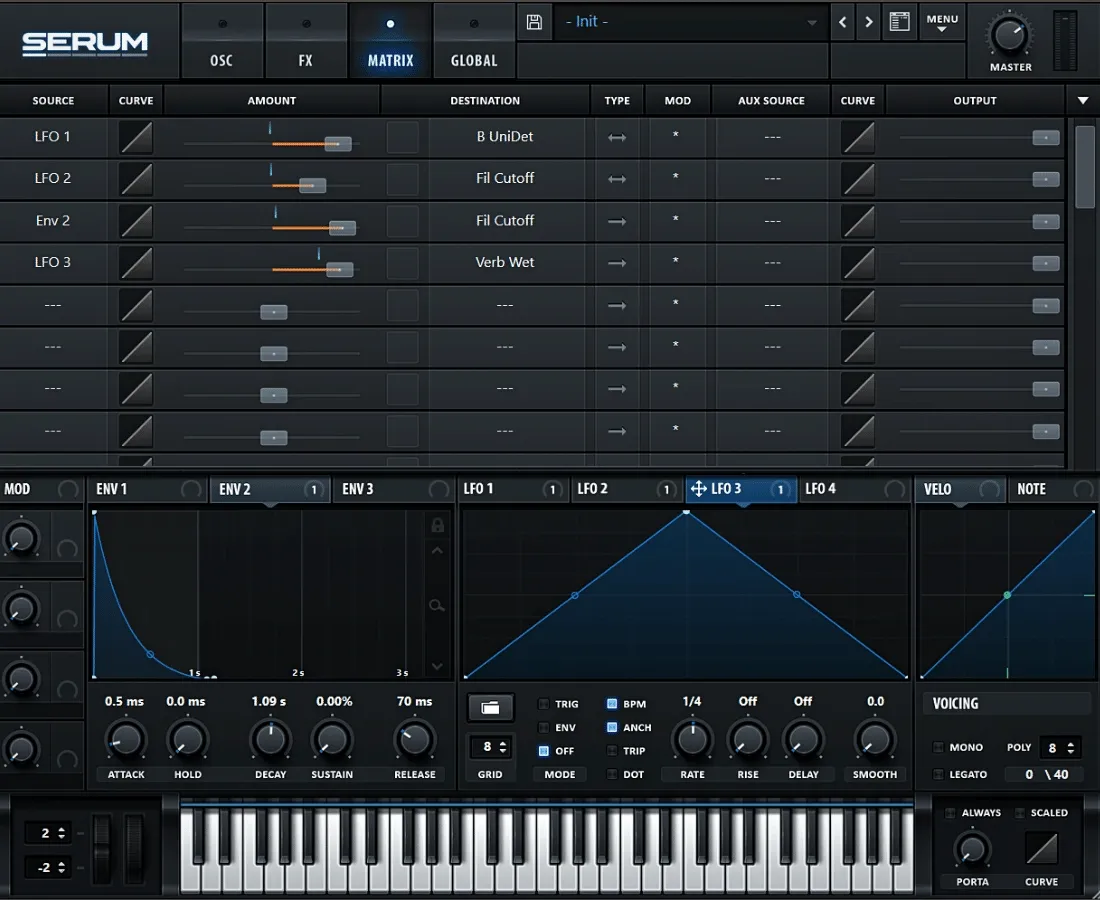
Image Source: Optoproductions
Modulation brings techno presets to life and turns static sounds into dynamic elements that develop throughout a track. Serum 2’s enhanced modulation features create new possibilities to craft professional-quality techno sounds.
LFO Routing for Groove
Pulsing rhythmic movements define the core of techno sound design. Serum 2’s rebuilt LFO engine lets producers create modulation paths that develop rather than just loop mechanically. You can design sounds that change continuously by routing LFOs to filter cutoffs or wavetable positions. Bass sounds that complement kicks work best with slower LFO rates (1/4 or 1/8). This ensures gradual development that matches your track’s energy.
These LFO techniques help create distinctive techno grooves:
Double-click to add/remove points in the LFO editor
Shift-click to draw step-sequencer-like patterns
Alt-click+drag points to snap to grid for precise rhythmic control
Envelope Modulation Strategies
Envelopes give you precise control over sound development. They excel at creating impact and tension in techno presets. The pitch envelope shapes the fast pitch movements that define techno drums and bass. This makes it a vital part of designing meaningful sounds.
Wavetable positions modulated by envelopes with carefully shaped curves create evolving textures. The “magnifying glass” area lets you zoom into envelopes. This gives you detailed control over attack and decay phases – significant elements in crafting organic movements in your xfer serum techno presets.
Using the Modulation Matrix
The Modulation Matrix works as the command center for complex modulation routing. The Matrix tab lets you assign sources (LFOs, envelopes, velocity) to almost any parameter.
Serum 2 features LFO Bus Paths that allow one LFO to influence another’s shape or rate. This creates modulation that develops over time instead of repeating similar patterns. Chaos LFOs, found in the Matrix tab under Sources, add organic, random movement and avoid mechanical repetition.
Creating Evolving Soundscapes
Melodic techno presets need atmospheric textures that combine multiple modulation sources. Serum 2’s new Path LFO mode enables two-dimensional motion. X and Y paths can control different parameters – to name just one example, X might control filter cutoff while Y adjusts reverb size.
The most compelling serum 2 techno presets ended up using wavetables as modulation sources themselves. This self-referential approach connects a sound’s spectral characteristics with its movement patterns. The result? Textures that change continuously without sounding artificial.
Refining and Organizing Your Presets
Your serum techno presets need proper organization after the design phase. A methodical approach to refining and cataloging presets will give a faster workflow and creative consistency.
Testing Presets in Context
Real compositions help reveal a preset’s true potential. Audio loops work well with your serum melodic techno presets to confirm their performance in real-life situations. Premium preset packs come with MIDI files and audio loops that show how sounds work within arrangements. Each sound should maintain balanced levels to protect your mix and ears during testing. The dance floor becomes the ultimate test – only the presets that perform well there are worth keeping.
Proper Naming Conventions
A clear naming system turns random collections into usable libraries. Your naming should begin with descriptive prefixes showing sound type—”BA” for bass sounds, “SFX” for effects, “LD” for leads. Techno kick designs need descriptive qualifiers (e.g., “Techno Kick – Punchy”). This system makes quick identification possible during creative sessions.
Creating Preset Categories
Function-based organization works better than genre-based sorting for xfer serum techno presets. Useful top-level categories include:
Bass, Plucks, Pads, Leads
Sequences, Atmospheres, FX
Guitars, Strings
Sound characteristics form the basis of subcategories—bass sounds can be divided into “Rolling/pluck,” “Reese,” or “Sustain & Sub”. This structure helps you find presets quickly during time-sensitive production work.
Backing Up Your Work
Serum’s menu icon lets you save custom presets through “Save Preset As”. Without doubt, regular backups protect your valuable sound design work from loss. You might want to export favorite presets with sample content to ensure cross-platform compatibility. Offline archives of your best serum 2 techno presets keep them available whatever software updates come along.
Conclusion
Becoming skilled at creating serum techno presets requires both technical precision and creative experimentation. Mastering Serum for techno production means understanding how to design powerful basslines, driving leads, and evolving textures that define professional serum techno presets. This guide explores essential techniques and advanced modulation strategies specifically tailored for building high-quality serum techno presets.
Professional serum techno presets demand careful frequency balance, controlled spatial depth, and precise envelope shaping. When designing serum techno presets, it’s important to craft tight low-end bass, punchy percussive elements, and atmospheric layers that work cohesively inside a mix. Strong layering and smart sound design decisions are what separate average patches from standout serum techno presets used in modern techno tracks.
With Serum 2, creating next-level serum techno presets becomes even more powerful thanks to expanded oscillator options, upgraded filters, and improved modulation routing. These enhancements allow producers to design more aggressive, evolving, and club-ready serum techno presets that cut through dense arrangements while maintaining clarity.
The best serum techno presets are never static. Movement is essential in techno production. By mastering LFO routing, envelope modulation, and matrix assignments, your serum techno presets will evolve naturally throughout a track. This dynamic motion gives serum techno presets their hypnotic and driving energy on the dancefloor.
Organization also plays a key role. Properly naming, categorizing, testing, and backing up serum techno presets ensures they remain accessible during creative sessions. Even the most powerful serum techno presets lose their value if you cannot quickly locate them when inspiration strikes.
Ultimately, designing original serum techno presets allows you to build a unique sonic identity — from industrial kicks and rolling basslines to dark atmospheres and textured synth sequences. Once you fully understand the structure and workflow behind serum techno presets, you can move beyond tutorials and develop a signature sound that sets your productions apart in 2026 and beyond.ther than strict rules. Soon enough, you’ll have a collection of signature sounds that showcase your style and make your tracks stand out on the dancefloor.