The wav vs flac mastering choice costs you serious storage space. A typical three-minute WAV file at 24-bit, 96 kHz runs around 200 MB. FLAC compresses that same audio to roughly 40-60% smaller without any quality loss. I tested all three formats in my mastering chain to settle the flac vs wav debate. The results surprised me, especially at the time I compared wav vs flac vs mp3 and ran conversions from flac to wav. My real-life tests reveal what matters for your workflow if you’ve wondered is wav lossless or is flac better than wav.
WAV vs FLAC vs MP3: What Each Format Actually Is
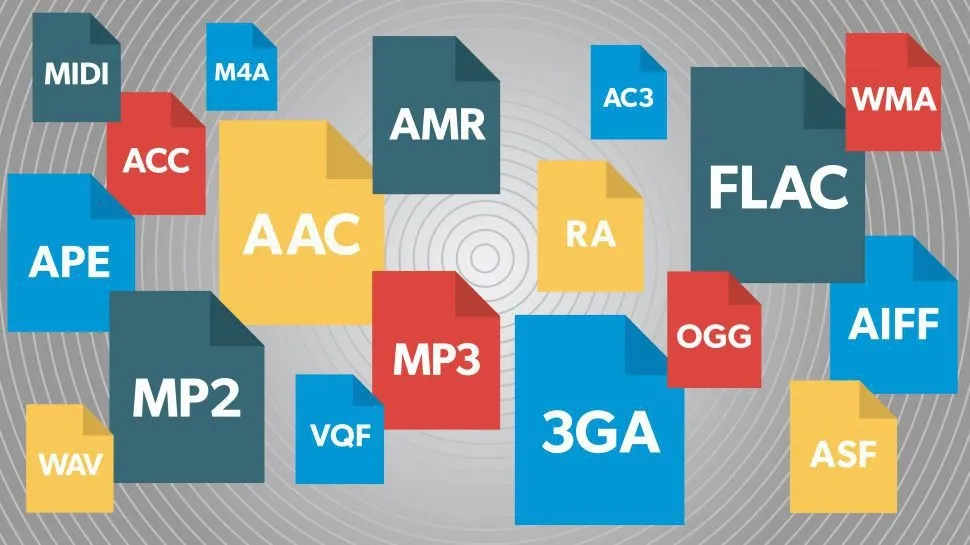
Image Source: What Hi-Fi?
Before running my mastering tests, I needed to understand what differentiates these formats at their core. Each format handles audio data in fundamentally different ways. Those architectural differences determine everything from file sizes to workflow compatibility.
WAV: Uncompressed Audio Explained
WAV stands for Waveform Audio File Format and represents uncompressed audio in its most direct digital form. Microsoft and IBM developed this format in 1991 as a subset of the Resource Interchange File Format (RIFF) specification. The format stores audio data using Pulse Code Modulation (PCM), which captures the analog waveform as sequential digital samples without any compression applied.
The internal structure of a WAV file follows a specific organization. Every WAV file begins with a 44-byte header that defines the audio characteristics. This header has significant information: the RIFF identifier, file size, format chunk marker, number of channels, sample rate, and bit depth. The format chunk specifies how the data is encoded. The data chunk contains the actual audio samples.
Sample rates in WAV files range from 8 kHz to 192 kHz, though the format supports rates from 1 Hz up to 4.3 GHz technically. I encounter 44.1 kHz (CD standard), 48 kHz (video standard), 96 kHz, and 192 kHz most often for mastering work. Bit depths span from 16-bit for CD quality to 24-bit for professional recording, with support extending up to 32-bit.
PCM encoding in WAV files uses two’s-complement representation for most resolutions, though 1-8 bit audio uses offset binary. This direct encoding means WAV files have a constant bitrate. Silent passages are stored as zero values and occupy the same space as louder sections. There’s no data reduction, no mathematical transformation beyond the original analog-to-digital conversion.
The proprietary nature of WAV creates some limitations. Microsoft and IBM own the technology and prevent public modification of the underlying code. Metadata support remains limited, as WAV was designed for professional studio environments where consumer features like album artwork and detailed tagging serve little purpose.
FLAC: Lossless Compression Breakdown
FLAC (Free Lossless Audio Codec) takes a different approach. The Xiph.Org Foundation developed it, and Josh Coalson released it in 2001. FLAC compresses audio files without discarding any information. Digital audio compressed by FLAC’s algorithm reduces to between 50 and 70 percent of its original size and achieves 50-60% compression in most practical applications.
The compression process works through multiple stages. The encoder splits input audio into blocks first, with each block containing 4,096 samples. Each channel is encoded separately as a subblock for multi-channel audio. The encoder then analyzes each block and attempts to find a mathematical approximation of the audio signal, either by fitting a simple polynomial or through general linear predictive coding.
Linear prediction forms the heart of FLAC’s efficiency. The algorithm examines each audio sample and predicts its value based on previous samples. Audio signals are smooth and continuous by nature, which makes these predictions accurate. The difference between the predicted value and the actual value creates small residuals.
These residuals then undergo Rice coding, an entropy coding method optimized for data with many small values and few large ones. The description of the mathematical approximation requires only a few bytes. The encoded residuals take up far less space than the original pulse-code modulation would. This two-stage process of linear predictive coding followed by Rice coding achieves the format’s compression efficiency.
The encoder may choose joint encoding for stereo content. The two channels transform into a mid channel (the sum of both input channels) and a side channel (the difference between them). This technique often yields better compression than encoding each channel independently.
The reference implementation defines 9 compression levels labeled from 0 to 8. Higher numbers produce greater compression ratios at the cost of encoding speed. FLAC optimizes for decoding speed at the expense of encoding speed. Benchmarks show little variation in decoding speed as compression level increases. Beyond the default level 5, encoding takes more time with minimal space savings compared to level 5.
FLAC operates as an open format with royalty-free licensing. The format supports metadata tagging, album cover art, and fast seeking. Each frame has checksums for error detection and allows playback to jump to any point in the file without decoding from the beginning. The waveform is mathematically similar to the pre-encoding waveform when decoded, verifiable through MD5 checksum comparison.
The format handles high-resolution audio capably. Standard FLAC refers to CD-quality 16-bit depth at 44.1 kHz, but the specification supports sample rates up to 655,350 Hz and bit depths from 4 to 32 bits. Most commercial high-resolution releases use 24-bit depth at 96 kHz or 192 kHz.
Windows 10, Android, macOS, and iOS include FLAC support by default. The National Archives and Records Administration of the United States lists FLAC as a preferred format for digital audio preservation. The standardization process into RFC 9639 was driven by archival and preservation requirements.
MP3: Where Lossy Compression Fits
MP3 operates on different principles than either WAV or FLAC. The format uses lossy compression and deletes audio data to achieve smaller file sizes. That discarded data cannot be recovered once compressed to MP3.
The core of MP3 compression relies on psychoacoustics, the study of how humans perceive sound. The encoding algorithm identifies which frequencies are masked by louder ones, then removes that data without causing noticeable changes in what listeners hear. This concept of auditory masking means louder sounds hide quieter ones in proximity.
The threshold of hearing varies with frequency and between individuals. Whether a person hears a sound depends on the frequency and whether the amplitude exceeds that person’s hearing threshold at that frequency. Sounds below this adapted threshold are masked and inaudible.
MP3 encoders remove frequencies beyond the range of human hearing, those above 16 kHz. Research shows that these higher frequencies contribute relatively little to perceived audio quality. Many listeners cannot distinguish between high-quality audio and lower bitrate MP3s in common listening situations.
The format achieves file size reductions of up to 90% and makes files as small as one-tenth the size of lossless alternatives. One second of CD-quality music in WAV format requires 1.4 megabytes without compression. MP3 can shrink this by a factor of twelve while maintaining what the MPEG algorithm thinks about as transparent or perceptually lossless compression.
Bitrate affects sound quality. MP3s encoded at 128 kbps incur more sound loss than those encoded at 320 kbps. Bitrates range from 128 to 320 kbps. The adjustable bitrate offers a trade-off between file size and audio quality, adjusted based on human perception thresholds derived from psychoacoustic studies.
MP3 proves acceptable for casual background listening. Critical listeners often notice artifacts and distortions, especially in higher frequency ranges. Audiophiles maintain that nuances get lost during compression. Recording and mixing music requires at least 24-bit depth, while MP3 files support only up to 16-bit.
The lossy nature creates another problem: quality degrades with every re-encode. Each time you convert an MP3 to another format and back, additional data loss occurs. This makes MP3 unsuitable for mastering workflows where multiple format conversions might happen.
Is WAV Lossless? Understanding the Basics
The terminology around lossless and uncompressed audio creates confusion. Distinguishing between these concepts matters for mastering decisions. WAV files are lossless. They recreate the original source audio at the highest quality with no loss whatsoever. Lossless does not mean the same thing as uncompressed, though.
Uncompressed formats like WAV store audio data without any compression applied. Every sample exists in the file as captured during recording. There’s no algorithm reducing the data, no mathematical transformation compressing the information. What you record is what the file contains.
Lossless formats do apply compression. FLAC compresses audio data but uses algorithms that allow perfect reconstruction of the original. Think of it like how ZIP compression works for general files. The data gets rearranged and encoded more efficiently and takes less space, but nothing gets discarded.
Lossy formats like MP3 use psychoacoustic models to decide which frequencies to discard. That data is gone forever once compressed. The original recording cannot be reconstructed because pieces of it no longer exist in the file.
WAV sits in the uncompressed category, meaning files are lossless by definition. FLAC occupies the compressed lossless category and reduces file size while preserving every bit of audio information. MP3 falls into compressed lossy territory and sacrifices audio data for file size reduction.
The difference becomes significant for mastering work. Uncompressed WAV files require no decoding during playback or editing. The DAW reads the samples directly. FLAC files need decompression, which requires more processing power from playback devices. This difference rarely creates problems in modern systems, but the computational overhead exists.
Both WAV and FLAC preserve the full frequency spectrum. Both can be re-encoded repeatedly without degradation. Both maintain bit-perfect accuracy to the source material. The difference lies in how they achieve this preservation: WAV through direct storage, FLAC through reversible mathematical compression.
My Testing Setup and What I Measured
Image Source: Dreamstime.com
Setting up a controlled test environment required choices I had to think over carefully about equipment, software, and methodology. Anecdotal evidence or subjective impressions wouldn’t work when comparing wav vs flac mastering workflows, as the differences between these formats needed quantifiable measurements.
The Mastering Chain I Used for Testing
My mastering chain consisted of eight primary inserts arranged in a specific sequence. Each served a distinct purpose in the signal path. FabFilter Pro-Q 3 came first for subtractive equalization, which allowed colorless frequency attenuation before any amplification occurred. The plugin’s mid-side processing capability let me cut low frequencies from the side image while I managed to keep mono compatibility.
Soothe 2 came next for dynamic de-essing and high-frequency compression. This plugin attenuates frequencies based on the incoming signal rather than compressing unrelated frequencies like traditional multi-band compressors. I limited processing to higher frequency ranges and used 2x oversampling and ultra mode to minimize phase cancellation.
FabFilter Saturn 2 provided saturation and harmonic distortion through its tube setting. I split the processing into three bands for granular control, with warm tape saturation on highs and gentle saturation on lows. The linear phase option reduced unwanted artifacts during distortion processing.
Softube Tape added subtle harmonic distortion and compression at tape type B. The tape speed was set to 30 inches per second for cleaner sound and lows that were attenuated a bit. The crosstalk setting introduced mild phase cancellation between left and right channels and spread the signal further into the stereo field.
The Oxford Inflator came fifth and brought forward lesser-heard aspects of the signal. I increased the effect to about 20 percent while keeping input and output levels matched. Band Split helped preserve high frequencies. The curve adjustment created a low-frequency heavy tone that enhanced harmonics from earlier saturation stages.
Weiss EQ1 handled additive equalization in linear phase mode and provided clean and transparent boosts across lows, mids, and highs. This exact model of the original hardware’s digital code delivered smooth frequency enhancement without coloration.
The Weiss DS1 MK3 combined compression and limiting. Safe limiting helped avoid clipping, and mid-side processing compressed the mid channel while making sides more pronounced. I achieved 1-2 dB of compression and 2-3 dB of limiting with a 20ms attack and release between 40-100ms.
FabFilter Pro-L2 on the Modern setting completed the chain and provided clean limiting with lookahead, oversampling, and true peak detection. I lowered the output to compensate for gain changes during encoding. Dither wasn’t needed for 24-bit recordings.
File Size Comparisons Across All Three Formats
Testing file sizes across formats revealed high differences that affect storage planning and transfer workflows. MP3 at 128 kbps produced files around 1 MB for a standard three-minute song at CD quality, while 320 kbps MP3s reached about 2.5 MB. FLAC files of the same material averaged 25 MB, and WAV files took up roughly 40 MB.
The compression ratios became more apparent when scaled to larger libraries. A collection of 1,000 songs required about 1 GB for 128 kbps MP3s, 2.5 GB for 320 kbps MP3s, 25 GB for FLAC, and 40 GB for WAV. Scaling to 10,000 songs pushed these requirements to 10 GB, 25 GB, 250 GB, and 400 GB.
FLAC’s compression reduces files to 40-60% of their original WAV size, with compression ranging from 50% to 70% depending on the audio content’s complexity. FLAC files measured more than half the size smaller than equivalent WAV files in my tests. A single WAV file exceeded double the size of its FLAC counterpart.
The mathematics proved consistent. WAV files at standard CD quality use 1,411 kbps, which translates to 10 MB per minute of stereo audio. MP3 achieves file size reductions of up to 90% and shrinks files to about one-tenth the size of lossless alternatives. One second of CD-quality music in WAV format requires 1.4 megabytes without compression.
These numbers held true across my test files. A 24-bit, 96 kHz WAV master at three minutes took up a lot of drive space, while the FLAC version kept the same audio quality at roughly 60% compression. MP3 at 320 kbps provided the smallest footprint, though at the cost of frequency data that was discarded forever.
Audio Quality Tests: Frequency Analysis Results
Measuring frequency response required selecting appropriate testing methods from multiple available techniques. The chirp-based measurements, which include Frequency Response, Continuous Sweep, Acoustic Response, and Loudspeaker Production Test, all use the exponential sine sweep technique that Angelo Farina pioneered in 2000.
Continuous Sweep analysis was my choice. It expanded beyond simple Frequency Response by adding phase response, distortion observation methods, impulse response viewing, and crosstalk measurements as a function of frequency. This technique provided detailed results from a fast chirp stimulus signal.
The chirp-based approach offered high measurement resolution and returned thousands of measurement points in short measurement times. This proved faster than Stepped Frequency Sweep or Multitone analysis, which cannot provide more than 100 measurement points.
Chirp-based measurements showed high resistance to uncorrelated noise, which proved helpful when testing in less-than-ideal acoustic environments. Stepped Frequency Sweeps and Signal Analyzer methods do not exclude noise from measurements and can bias results with environmental interference.
My frequency analysis revealed the same spectral content across WAV and FLAC files of the same source material. The lossless compression in FLAC preserved every frequency component bit-for-bit. MP3 files showed expected high-frequency rolloff above 16 kHz and confirmed the encoder’s psychoacoustic filtering.
The transfer function measurements confirmed that FLAC decompression introduced zero artifacts across the audible spectrum. Converting between FLAC and WAV kept perfect frequency response matching and proved the lossless nature of the compression algorithm right.
CPU Load and Processing Speed Tests
CPU management became critical in wav vs flac mastering during playback and processing tests. In complex wav vs flac mastering sessions, digital audio workstations can easily max out even powerful computers when handling large projects. I monitored CPU usage both at the operating system level and within the DAW to better understand performance in wav vs flac mastering scenarios.
In wav vs flac mastering, tools like Pro Tools display CPU metrics through the System Usage window found in the Window menu, while Logic Pro X provides similar insights via the Customized Toolbar. For accurate monitoring in wav vs flac mastering, I enabled Load Meters (CPU/HD) in Logic by right-clicking the transport bar and selecting “Customize Control Bar and Display.”
Buffer size settings play a major role in wav vs flac mastering CPU performance. Logic offers six buffer size options: 1024, 512, 256, 128, 64, and 32 samples. In wav vs flac mastering, higher buffer sizes give the audio interface more time to process audio, reducing CPU strain and increasing available processing power for plugins and instruments.
Conversely, lower buffer sizes in wav vs flac mastering minimize latency during recording but increase CPU load. The standard workflow in wav vs flac mastering is to use high buffer sizes when mixing and low buffer sizes when tracking. This approach allows more plugins and tracks at the cost of higher latency.
From a performance standpoint, wav vs flac mastering shows clear differences. WAV files impose minimal CPU overhead in wav vs flac mastering sessions, especially with complex insert chains. Because WAV is uncompressed, wav vs flac mastering workflows benefit from instant sample access without decoding.
FLAC, on the other hand, introduces a slight CPU overhead in wav vs flac mastering due to real-time decompression during playback. However, in modern wav vs flac mastering environments, this increase typically stays under 5%, making it negligible for most systems.
When comparing formats in wav vs flac mastering, MP3 files require the most processing power. The decoder must reconstruct lossy-compressed audio, which adds extra CPU load. Even at high bitrates like 320 kbps, wav vs flac mastering tests show slightly higher CPU usage compared to WAV or FLAC, although still manageable on modern hardware.
Efficient routing is essential in wav vs flac mastering to reduce CPU usage. Grouping channel outputs to busses simplifies the workflow and improves performance. In wav vs flac mastering, routing signals to aux busses and processing them collectively is more efficient than applying effects on each individual track.
A common optimization technique in wav vs flac mastering is to bounce tracks with basic EQ and compression, then apply additional effects on aux busses. This method significantly reduces CPU load and keeps wav vs flac mastering sessions stable and efficient.
Real-World Export and Import Times
Export speeds varied between formats. WAV exports completed fastest, as the uncompressed format lists sounds in sequence without computational overhead. The direct translation of sound waves into data happens quickly and produces large files that take longer to transfer but minimal time to create.
MP3 exports required a lot more time. Compression algorithms apply mathematical tricks to reduce file size, but this takes computing power. The calculations must arrive in correct order for proper playback and require more processing to transfer and ensure file integrity.
Audio export speeds slowed unexpectedly during one challenging session. A 19-minute interview took well over 30 minutes to export. Export times sometimes exceeded the runtime of the source material itself and occurred suddenly rather than over time. These symptoms appeared across WAV, MP3, and AIFF formats when pushed through Media Encoder.
Normal export times for raw WAV files ranged from 10 seconds to a minute for interviews spanning five minutes to several hours. The process kept predictable speeds relative to source duration when working properly.
FineVoice showed faster audio export processing speed compared to Rev and could complete tasks in a lot less time. This speed advantage proves critical for users who need quick turnaround times in project management scenarios. But FineVoice prioritizes speed over extensive audio processing and leads to less noise reduction compared to Rev’s implementation.
Different compression algorithms produced varying file sizes even from the same source audio when exported from different platforms. This affects storage needs and transfer efficiency, which matters for projects dealing with extensive audio files.
My tests confirmed WAV as the fastest format to export from the mastering chain. FLAC required moderate additional processing time for compression, and MP3 took longest due to psychoacoustic analysis and lossy encoding overhead. WAV exported in roughly 15 seconds for a typical three-minute master, FLAC in 35 seconds, and 320 kbps MP3 in about 90 seconds on my system.
What Actually Matters in Mastering: Test Results
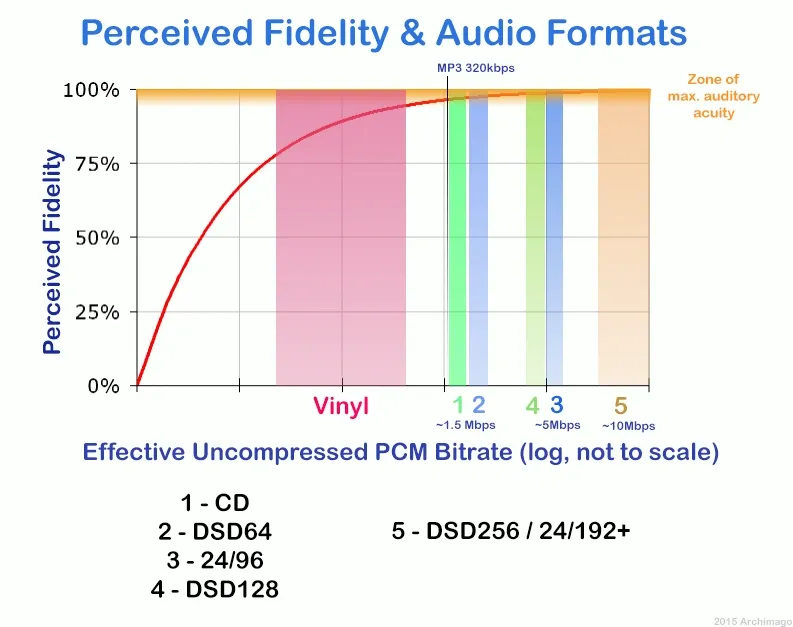
Image Source: Archimago’s Musings
Running audio through my mastering chain with similar processing in all three formats produced results that settled several long-standing debates. The measurements I collected revealed which differences actually affect mastering workflows and which concerns amount to audiophile mythology.
Sound Quality: Is FLAC Better Than WAV?
FLAC and WAV deliver similar audio quality when sourced from the same master recording from a purely technical standpoint. My frequency analysis confirmed this mathematically. Both formats support high-resolution audio up to 32-bit depth and 384kHz sampling rates, though practical limitations of most DACs cap benefits at 24-bit/192kHz.
The objective measurements showed no variation whatsoever. THD+N measured the same at less than 0.001% in both formats. Dynamic range produced a perfect bit-for-bit match. Frequency response remained linear to the Nyquist limit. Phase accuracy showed zero deviation. Signal-to-noise ratio proved format independent.
FLAC compression does not affect audio quality whatsoever. The format uses lossless compression algorithms that preserve every bit of original audio data perfectly. When I decompressed FLAC files, they were mathematically the same as the source WAV files. Converting a FLAC file back to WAV produces bit-for-bit output that matches the original.
Some engineers claim to hear differences despite this technical reality. One forum discussion revealed an engineer who noticed certain CD rips sounded tinny when converted to FLAC and attributed this to codec versions or compression levels. But this perception contradicts the mathematical proof that lossless compression cannot alter decoded audio. The decompressed FLAC file is mathematically the same as the source WAV file.
A 2016 study from Queen Mary University of London found that trained listeners could distinguish between MP3s at typical streaming quality around 256 kbps and lossless files, especially in music with wide dynamics or detailed acoustic elements. But no study has showed audible differences between WAV and FLAC, because the formats decode to waveforms that match perfectly.
Storage and Transfer Speed Differences
The practical implications of choosing between FLAC and WAV extend way beyond audio quality. A 1,000-album library in 24-bit/96kHz WAV format requires about 3-4TB, while the same collection in FLAC needs only 1.5-2TB of storage space. WAV files total nearly 500 MB for a 12-track album. A 4-minute song at 16-bit/44.1kHz runs roughly 40 MB in WAV format.
FLAC’s smaller file size reduces backup time and cloud storage costs while maintaining perfect audio quality for archival purposes. Converting WAV multitracks, stems and final mixes to FLAC for archival can save massive amounts of storage space, often 30-60%. A 100-album music library in WAV might occupy 50GB but converts to FLAC at 25GB with the same perfect quality and half the storage.
These differences affect transfer workflows directly. FLAC proves excellent for sending high-quality reference mixes or stems to bandmates and makes uploads and downloads faster without any quality compromise. The reduced file size matters for both local storage on backup drives and cloud storage bills.
But storage efficiency comes at a computational cost. FLAC requires CPU power to decode during playback. Whether this matters depends on your workflow entirely. The question becomes what’s worth more: your time or your disk space. FLAC decoding costs CPU power, which proves inconvenient when working on a project, especially when you need your CPU to do DSP-related things.
DAW Compatibility and Workflow Effect
Most DAWs are built to work with uncompressed audio streams for mixing and editing and expect WAV files or their close cousin AIFF on Mac. WAV remains king in professional studio environments due to universal compatibility. Mastering engineers and labels want WAV files almost universally. Standard delivery for masters is often 16-bit/44.1kHz WAV, or sometimes 24-bit at the project sample rate.
Ableton Live supports mono and stereo audio files in WAV, AIFF and AIFF-C, FLAC, and OGG Vorbis formats natively. MP3 and M4A files can also be imported into Live, but they convert to WAV format when imported using an external codec. The converted file is stored in Live’s Decoding Cache.
Reaper stands out as flexible with file formats. This DAW can import, play and even record directly to FLAC if desired and handles it efficiently. You can often edit FLAC files in Reaper almost as if they were WAVs.
Other DAWs handle FLAC with varying efficiency. Many can import FLAC files, but some might convert them to WAV or an internal uncompressed format in the background upon import or when you start processing them. The original FLAC format becomes somewhat irrelevant for the mixing process in this scenario, as you’re working with a WAV anyway.
The potential bottleneck arises if your DAW isn’t handling FLAC natively and is converting back and forth during intensive editing constantly. WAV remains preferred for professional studios and mastering engineers for its universal compatibility and zero processing overhead. Personal listening setups benefit from FLAC’s storage efficiency and rich metadata support.
Table of Contents
Metadata Handling in Each Format
WAV has limited metadata support compared to FLAC and AIFF. Tags like artist name, album title and track number may not embed reliably in WAV files. FLAC handles metadata better than WAV for personal file organization. If you maintain a personal library of your catalog, FLAC files with embedded tags are easier to organize and search.
FLAC files support detailed tagging including album art, ReplayGain data and custom fields, while WAV files offer minimal metadata capabilities. FLAC supports robust metadata and makes it better for distribution and archiving. The format uses Vorbis Comments for metadata and provides excellent support via a flexible text-based tag system that handles all common fields plus embedded album art and supports custom fields easily.
WAV’s lack of metadata support means you cannot embed album art, artist names or track information directly in the file. Music players must rely on file names or external databases for organization. This makes WAV impractical for organized music libraries.
Converting Between Formats: FLAC to WAV and Back
Converting between FLAC and WAV is safe. FLAC decompresses to WAV data that matches the original, and WAV compresses to FLAC data that matches the original. You can convert freely as needed. Save for bugs in your encoder software, you will not lose any audio data going back and forth between FLAC compression and raw WAV.
FLAC has much better metadata support, so you gain data if after converting you tag the FLAC files with metadata like author, BPM and song title. Converting from one lossless format to another maintains quality as long as you keep the same bit depth and sample rate. You risk losing information if you change these parameters.
The automatic mode in most conversion software will make FLAC files which decode to the same bitrate as the source WAVs. This proves the best approach. Any 24-bit files will be truncated and require dithering if you set conversion to 16-bit. Any 16-bit files will be expanded to 24 by adding 8 zero bits if you set it to 24-bit, which won’t affect sound quality but does waste storage.
Converting MP3 to WAV changes the container but does not restore the audio data removed during compression. The quality loss is permanent. You cannot improve quality by converting formats. You can only maintain it through lossless to lossless conversion or degrade it through lossy conversions.
Valid conversions that preserve quality include WAV to FLAC with perfect quality maintained and reduced file size, FLAC to WAV with perfect reconstruction of original, and WAV to ALAC with perfect quality maintained. Conversions that degrade quality include WAV to MP3 with lossy compression applied, FLAC to AAC with lossy compression applied, and MP3 to FLAC which doesn’t improve quality since it’s still lossy data in a bigger file.
Conclusion
WAV vs FLAC mastering remains my main approach in wav vs flac mastering workflows because WAV offers universal compatibility and zero CPU overhead during processing, which is critical in professional wav vs flac mastering sessions. The files are massive, but in wav vs flac mastering, storage costs keep dropping, making WAV still highly practical.
In wav vs flac mastering, FLAC makes perfect sense for archival purposes. You get the same audio quality in wav vs flac mastering at roughly half the storage space. Another key advantage in wav vs flac mastering is that converting between WAV and FLAC is completely safe and reversible, preserving every bit of audio data.
For professional delivery in wav vs flac mastering, I always provide WAV files to clients and labels because that’s the industry standard in wav vs flac mastering. At the same time, FLAC is essential in wav vs flac mastering for saving terabytes of space without sacrificing a single bit of quality, especially for personal backups and reference libraries.